
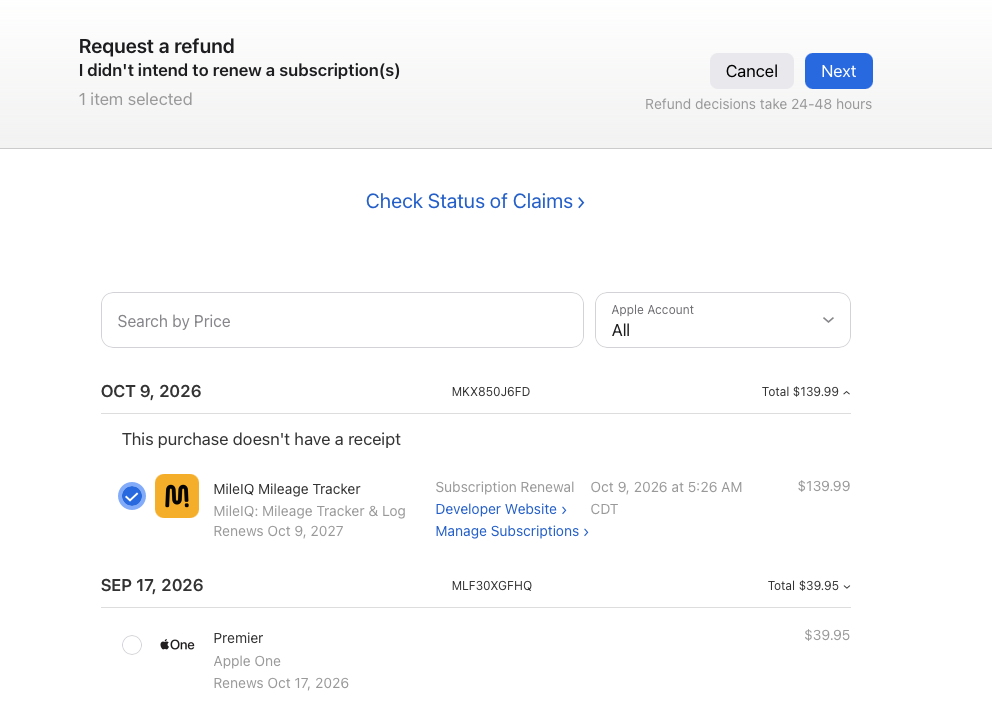
Today received a notification of a $139.99 charge on my Apple Card that had no explanation. In just a few minutes I was able to take care of it, so I thought I’d share what I did.
My first step is always to look at Apple subscriptions on my phone. To do that:
- Open Settings
- Touch your name/picture
- Touch Subscriptions
- Touch the transaction with the amount you’re looking for
In this case, there was no transaction for $139.99. That’s probably because I have two Apple IDs (the old one is from back in the days of iTunes) and the transaction was on the old one.
So I went to my computer and googled “Apple Report a Problem.” That sent me to this URL: https://reportaproblem.apple.com/?s=6. Once there, I logged in with my fingerprint. I still didn’t see the $139.99 charge so under Apple Account I selected All in the drop down.
There it was! $139.99 renewal for MileIQ, a mileage tracker I’ve used for years. It’s an excellent app, but since the price had gone up (it was $89.99 last year and $59.99 for the four years before) and I’m doing a lot less business-related driving, I had decided to cancel it. And I thought I had! But apparently not.

Luckily, there was an easy solution. Under “What can we help you with?” I selected Request a refund. Under “Tell us more,” I selected I didn’t intend to renew a subscription(s). Then I selected the transaction in question and clicked Next. The transaction disappeared. I’m supposed to have a decision about the refund within a couple of days but I already received a notification from MileIQ saying they’re sorry to see me go and dangling a special offer. (I won’t take them up on it.)
I learned about Report a Problem a few years back and it’s been a game changer for me. Those Apple subscriptions and purchases can be so tricky to track down I just had to share.
Leave a Reply